A Step By Step guide to using the tool and an explanation of the mechanics behind its time calculations
How To Use The App
- Select your location. Choose your city from the first dropdown. The app auto-detects your browser’s timezone on load, but you can override it at any time.
- Set the meeting time. Drag the slider (or type a value) to the time in your timezone when you want the meeting to start. The slider covers the full 24-hour day in 30-minute increments.
- Add participant timezones. Use the second dropdown to pick each participant’s city, then click Add. Repeat for as many people as you need. Your list is saved in your browser and persists between visits.
- Read the traffic-light results. Each participant’s box is colour-coded:
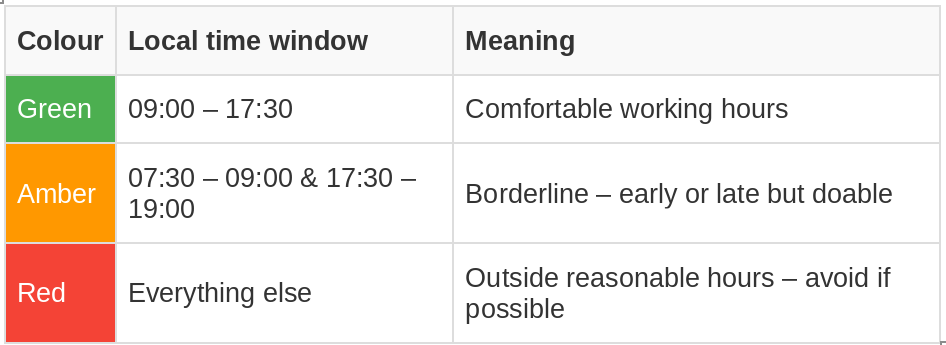
Remove a timezone by clicking the trash icon new to its row.
How The Calculations Work
Accurate Time Offset Calculation
TimeSynch does not rely on a hardcoded offset table. Instead, it uses the browser’s built-in Intl.DateTimeFormat API with IANA timezone identifiers (e.g., Europe/London, America/New_York). These identifiers are backed by the IANA Time Zone Database, which is the same authoritative source used by operating systems, servers, and programming languages worldwide.
The process for each timezone is:
- The app takes the meeting’s absolute UTC timestamp.
- It asks the browser: “What are the hour and minute in this timezone at that exact instant?”
- It reconstructs that local reading as a pseudo-UTC value and subtracts the original UTC value. The difference is the precise offset in minutes for that moment.
Because the offset is computed for the specific instant of the meeting, it is always correct — whether that instant falls in winter or summer, before or after a DST transition.
Why this matters: A static table of “London = UTC+0” would be wrong for half the year. By querying the browser’s timezone engine at the exact meeting time, TimeSynch always gets the right answer.
Handling Calendar Day Boundaries
When a meeting at, say, 18:00 in London maps to 13:00 the next day in Sydney, the app handles this transparently:
- Display: The time boxes show only the hour and minute (e.g., 13:00). The date is intentionally omitted because the traffic-light system is about time of day, not calendar date. A 13:00 in Sydney is a 13:00 regardless of whether it’s the same calendar day as London.
- Calculation: The underlying math operates on absolute UTC millisecond timestamps, which are continuous and have no “day boundary.” Converting a UTC instant to a local time can wrap past midnight (e.g., 23:30 UTC → 00:30 the next day in UTC+1), but the arithmetic is a simple addition/subtraction of the offset — no special-case logic is needed.
- Slider → UTC conversion: When you set the slider, the app reads your local date (year, month, day) in your timezone, combines it with the chosen hour/minute, and converts to UTC. It performs this conversion twice (an iterative refinement) to guarantee correctness even if the offset itself changes between the first and second pass (see DST section below).
Practical example: You set the slider to 22:00 in Europe/London. For a participant in Australia/Sydney (UTC+11), the box will show 09:00 — the next calendar day, but displayed simply as 09:00 in green.
Accounting for Daylight Savings Time (DST)
DST is handled entirely by the IANA timezone database via the browser’s Intl API. TimeSynch never hardcodes a DST rule. Here’s how it plays out in practice:
- Correct offset at the meeting time: If your meeting is on 15 March in America/New_York, the browser returns UTC−5 (EST). If it’s on 15 April, it returns UTC−4 (EDT). No extra code is needed — the database encodes every historical and future transition for every zone.
- Iterative refinement for edge cases: The slider-to-UTC conversion runs the offset lookup twice. This guards against the rare scenario where the first estimated UTC instant falls on one side of a DST boundary and the corrected instant falls on the other (e.g., a meeting scheduled at exactly 02:00 local time on the day clocks spring forward). The second pass re-queries the offset at the corrected instant and produces the final, accurate result.
- Half-hour and 45-minute offsets: Zones like Australia/Adelaide (UTC+9:30 / +10:30), Asia/Kathmandu (UTC+5:45), and Pacific/Marquesas (UTC−9:30) are handled identically — the offset is whatever the database says for that instant, in minutes, with no assumption of whole-hour increments.
- Historical and future transitions: Because the IANA database is updated regularly by the browser, TimeSynch automatically reflects any government-announced DST changes (e.g., a country abolishing DST) without any code update on your part.
Limitations and Notes
- The app does not display the calendar date for each timezone — only the time of day. If you need to confirm whether a meeting falls on the same or next day, compare the times: if the remote time is “earlier” than yours by more than ~12 hours, it’s likely the next day.
- The traffic-light ranges are set for commonly agreed working hours fixed and not adjustable.
- Saved timezones are stored in your browser’s local storage — they are per-device and per-browser, not synced across devices.
- The app requires a modern browser (Chrome 70+, Firefox 68+, Safari 14+, Edge 79+)